 Login
Join
Logout
Login
Join
Logout
Today Sudoku
Classic Sudoku
Samurai Sudoku
Archives
Sudokus with no one can solve
X Sums Sudoku
Classic Sudoku
Little killer sudoku
Extra Regions Sudoku
Makodoku
Sum Frame Sudoku
Group Sum Sudoku
Greater Than Sudoku
Multi Diagonal Sudoku
Clone Sudoku
Skyscrapers Sudoku
Hybrid Sudoku ( X Sums + Consecutive )
Quadruple sudoku
Hybrid Sudoku ( X Sums + Consecutive )
Kropki Sudoku
Hybrid Sudoku ( Consecutive Pairs + Sum Frame )
Greater Than Kropki Sudoku
Consecutive Sudoku
XV Sudoku
Consecutive Sudoku
Thermo Sudoku
Exclude Sudoku
MiniMax Sudoku
XV Sudoku
Count different Sudoku
Hybrid Sudoku ( X Sums + Greater Than )
Color Sudoku
Hybrid Sudoku ( Greater Than + Sum Frame )
Products Sudoku
Maximin Sudoku
Join
Welcome to Sudoku Today!
Welcome to Sudoku.today! Enjoy daily Sudoku puzzles including classic Sudoku and over 50 unique variants. Challenge your mind every day with new puzzles!

New Tutorial: Master Advanced Sudoku Techniques
Visualize the logic of Skyscraper, 2-String Kite, and Turbot Fish (X-Chain).
▶ Watch VideoToday's Sudoku
31 March 2026
X Sums Sudoku
- Place a digit from 1 to 9 into each of the empty squares so that each digit appears exactly once in each of the rows, columns and the nine outlined 3x3 regions.
- Each number outside the grid is the sum of the first X numbers placed in the corresponding direction, where X is equal to the first number placed in that direction.
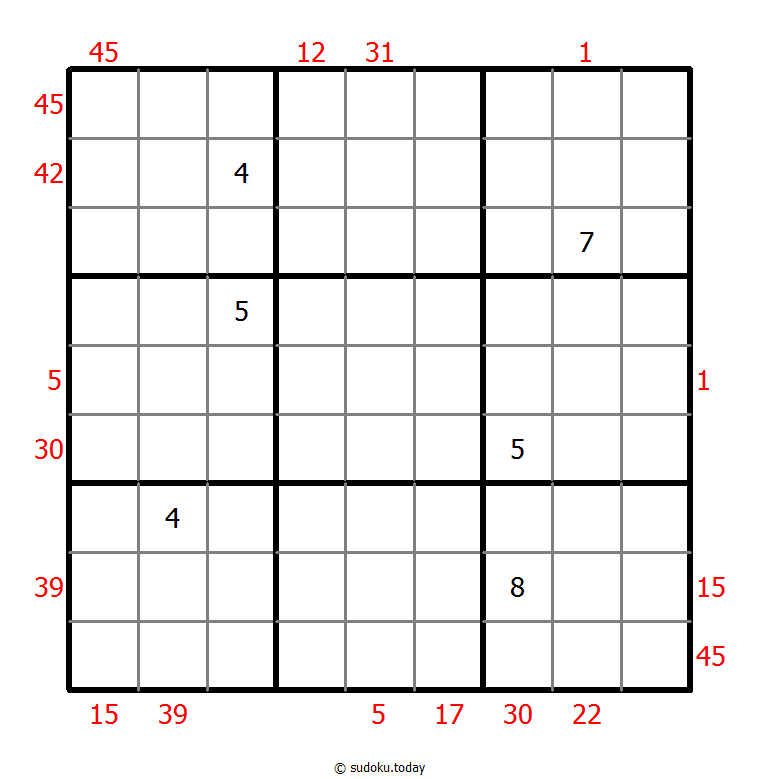
X Sums Sudoku
- Place a digit from 1 to 9 into each of the empty squares so that each digit appears exactly once in each of the rows, columns and the nine outlined 3x3 regions.
- Each number outside the grid is the sum of the first X numbers placed in the corresponding direction, where X is equal to the first number placed in that direction.
Extra Regions Sudoku
- Place a digit from 1 to 9 into each of the empty squares so that each digit appears exactly once in each of the rows, columns and the nine outlined 3x3 regions.
- The connected shaded cells contain each digit from 1 to 9.
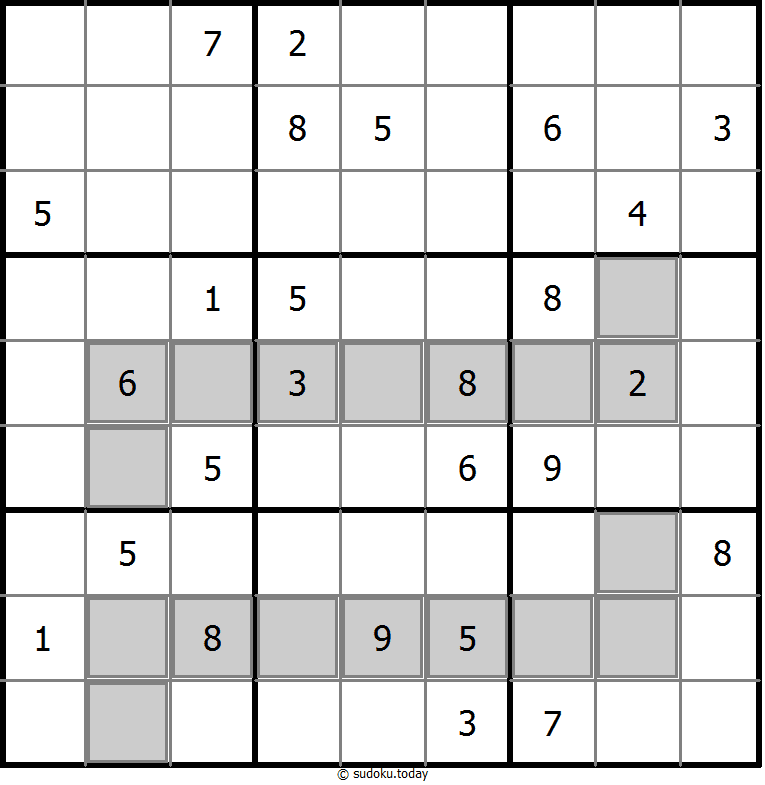
Extra Regions Sudoku
- Place a digit from 1 to 9 into each of the empty squares so that each digit appears exactly once in each of the rows, columns and the nine outlined 3x3 regions.
- The connected shaded cells contain each digit from 1 to 9.
Odd Even Sudoku
- Place a digit from 1 to 9 into each of the empty squares so that each digit appears exactly once in each of the rows, columns and the nine outlined 3x3 regions.
- Cells with shaded squares contain even digits. Cells with shaded circles contain odd digits.
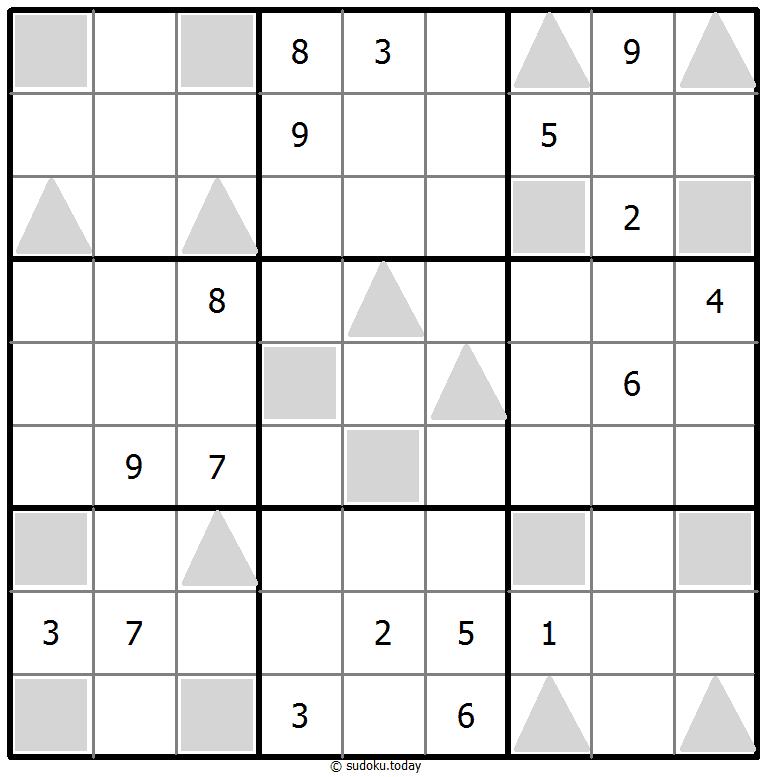
Odd Even Sudoku
- Place a digit from 1 to 9 into each of the empty squares so that each digit appears exactly once in each of the rows, columns and the nine outlined 3x3 regions.
- Cells with shaded squares contain even digits. Cells with shaded circles contain odd digits.
Differences Sudoku
- Place a digit from 1 to 9 into each of the empty squares so that each digit appears exactly once in each of the rows, columns and the nine outlined 3x3 regions.
- A number between two cells indicates the difference of the numbers in these cells. A number between four cells indicates the difference between two diagonally adjacent cells, either top left + right bottom (\) or top right + bottom left (/). If one of the characters < or > is specified the apex of the angle points to the smaller of these numbers.
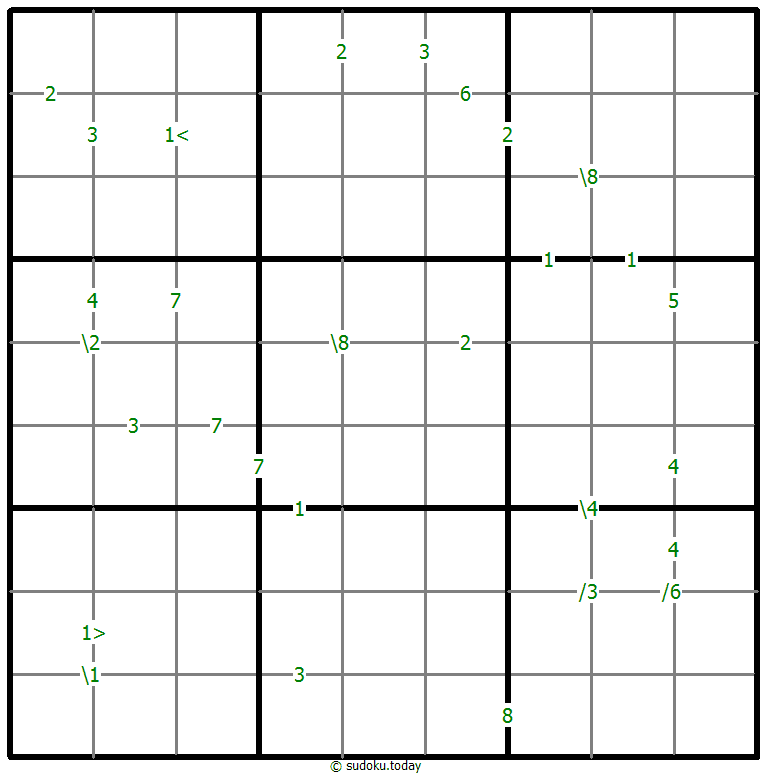
Differences Sudoku
- Place a digit from 1 to 9 into each of the empty squares so that each digit appears exactly once in each of the rows, columns and the nine outlined 3x3 regions.
- A number between two cells indicates the difference of the numbers in these cells. A number between four cells indicates the difference between two diagonally adjacent cells, either top left + right bottom (\) or top right + bottom left (/). If one of the characters < or > is specified the apex of the angle points to the smaller of these numbers.
Greater Than Sudoku
- Place a digit from 1 to 9 into each of the empty squares so that each digit appears exactly once in each of the rows, columns and the nine outlined 3x3 regions.
- Digits have to be place in accordance with the “greater than” signs.
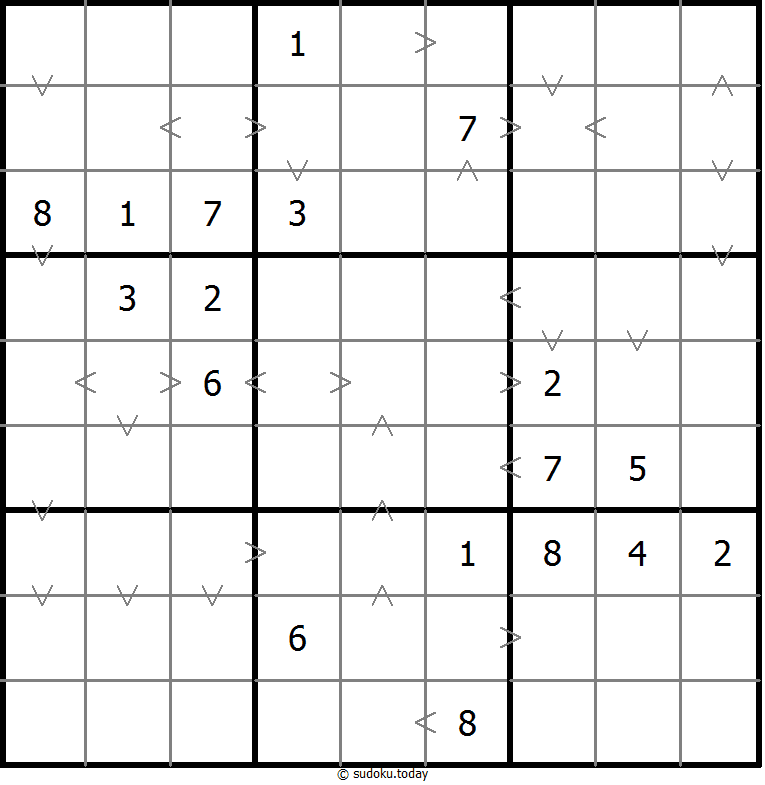
Greater Than Sudoku
- Place a digit from 1 to 9 into each of the empty squares so that each digit appears exactly once in each of the rows, columns and the nine outlined 3x3 regions.
- Digits have to be place in accordance with the “greater than” signs.
Hybrid Sudoku ( X Sums + Greater Than )
- Place a digit from 1 to 9 into each of the empty squares so that each digit appears exactly once in each of the rows, columns and the nine outlined 3x3 regions.
- Each number outside the grid is the sum of the first X numbers placed in the corresponding direction, where X is equal to the first number placed in that direction.
- Digits have to be place in accordance with the “greater than” signs.
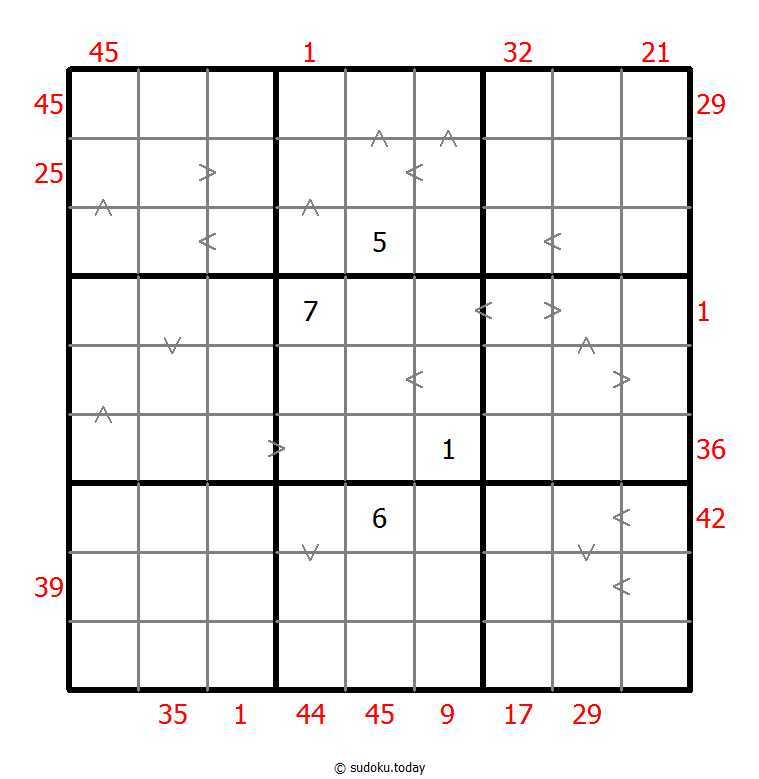
Hybrid Sudoku ( X Sums + Greater Than )
- Place a digit from 1 to 9 into each of the empty squares so that each digit appears exactly once in each of the rows, columns and the nine outlined 3x3 regions.
- Each number outside the grid is the sum of the first X numbers placed in the corresponding direction, where X is equal to the first number placed in that direction.
- Digits have to be place in accordance with the “greater than” signs.
Clone Sudoku
- Place a digit from 1 to 9 into each of the empty squares so that each digit appears exactly once in each of the rows, columns and the nine outlined 3x3 regions.
- Grey cells in the grid represent many cloned areas. Digits in these areas on corresponding positions must be identical. Cloned areas are only moved, without rotation or reflection.
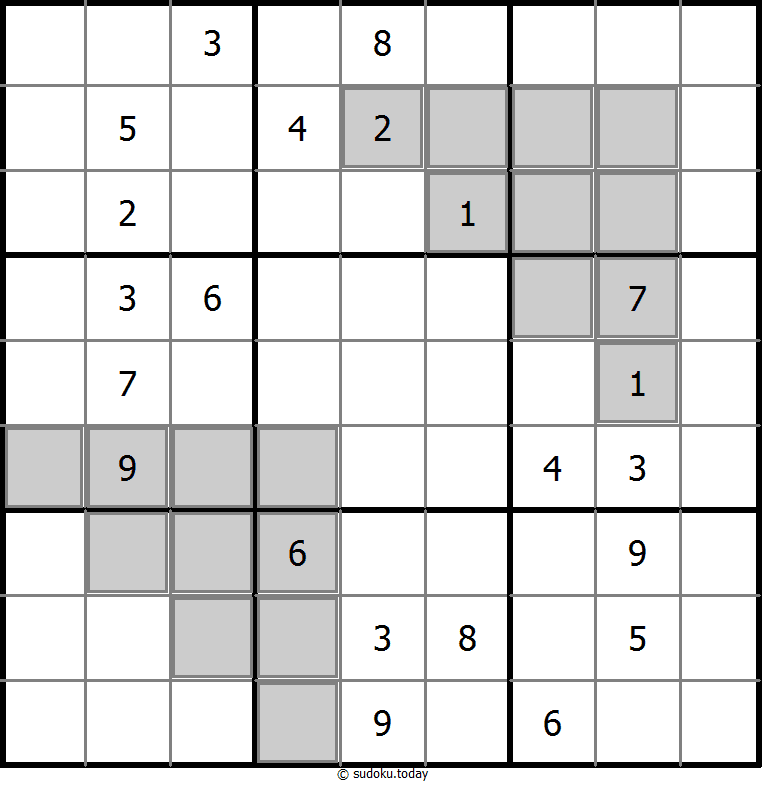
Clone Sudoku
- Place a digit from 1 to 9 into each of the empty squares so that each digit appears exactly once in each of the rows, columns and the nine outlined 3x3 regions.
- Grey cells in the grid represent many cloned areas. Digits in these areas on corresponding positions must be identical. Cloned areas are only moved, without rotation or reflection.
Hybrid Sudoku ( X Sums + Greater Than )
- Place a digit from 1 to 9 into each of the empty squares so that each digit appears exactly once in each of the rows, columns and the nine outlined 3x3 regions.
- Each number outside the grid is the sum of the first X numbers placed in the corresponding direction, where X is equal to the first number placed in that direction.
- Digits have to be place in accordance with the “greater than” signs.
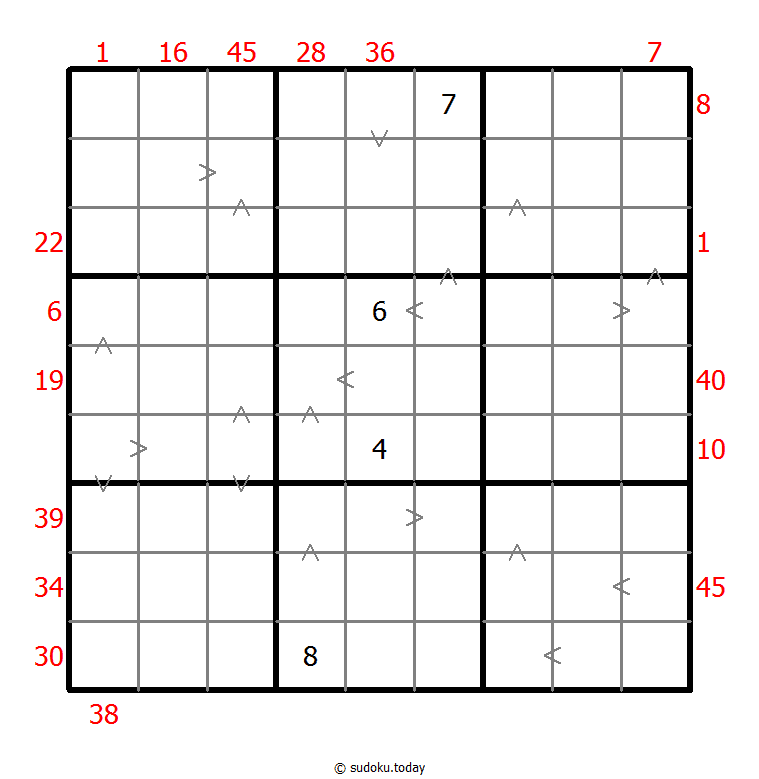
Hybrid Sudoku ( X Sums + Greater Than )
- Place a digit from 1 to 9 into each of the empty squares so that each digit appears exactly once in each of the rows, columns and the nine outlined 3x3 regions.
- Each number outside the grid is the sum of the first X numbers placed in the corresponding direction, where X is equal to the first number placed in that direction.
- Digits have to be place in accordance with the “greater than” signs.
Sum Frame Sudoku
- Place a digit from 1 to 9 into each of the empty squares so that each digit appears exactly once in each of the rows, columns and the nine outlined 3x3 regions.
- Digits outside the grid indicate the sum of the first 3 digits in the corresponding direction.
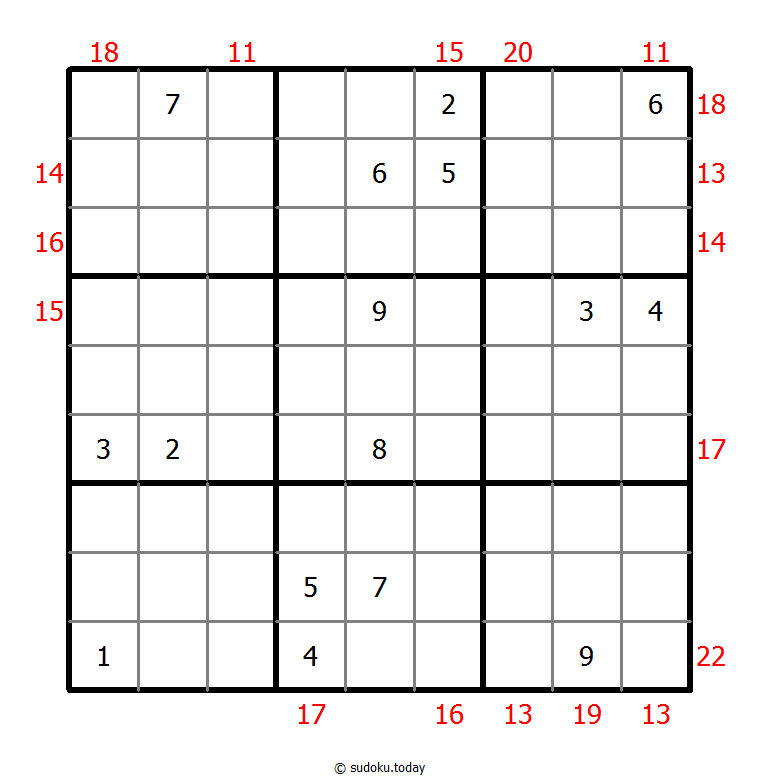
Sum Frame Sudoku
- Place a digit from 1 to 9 into each of the empty squares so that each digit appears exactly once in each of the rows, columns and the nine outlined 3x3 regions.
- Digits outside the grid indicate the sum of the first 3 digits in the corresponding direction.
Parity Lines Sudoku
- Place a digit from 1 to 9 into each of the empty squares so that each digit appears exactly once in each of the rows, columns and the nine outlined 3x3 regions.
- Digits along each marked line are either all odd or all even.
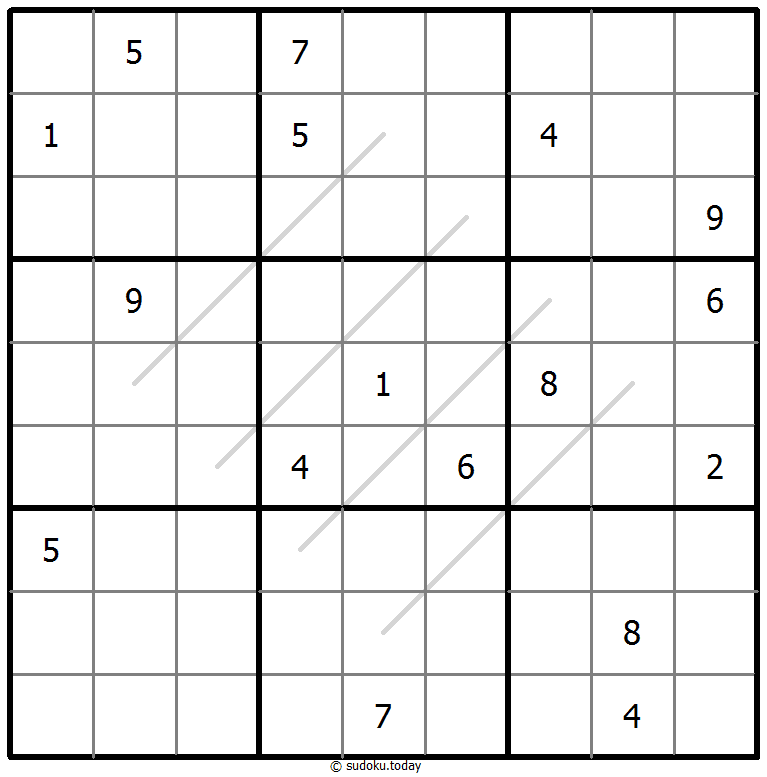
Parity Lines Sudoku
- Place a digit from 1 to 9 into each of the empty squares so that each digit appears exactly once in each of the rows, columns and the nine outlined 3x3 regions.
- Digits along each marked line are either all odd or all even.
Sums Sudoku
- Place a digit from 1 to 9 into each of the empty squares so that each digit appears exactly once in each of the rows, columns and the nine outlined 3x3 regions.
- A number between two cells indicates the sum of the numbers in these cells. A number between four cells indicates the sum between two diagonally adjacent cells, either top left + right bottom (\) or top right + bottom left (/).
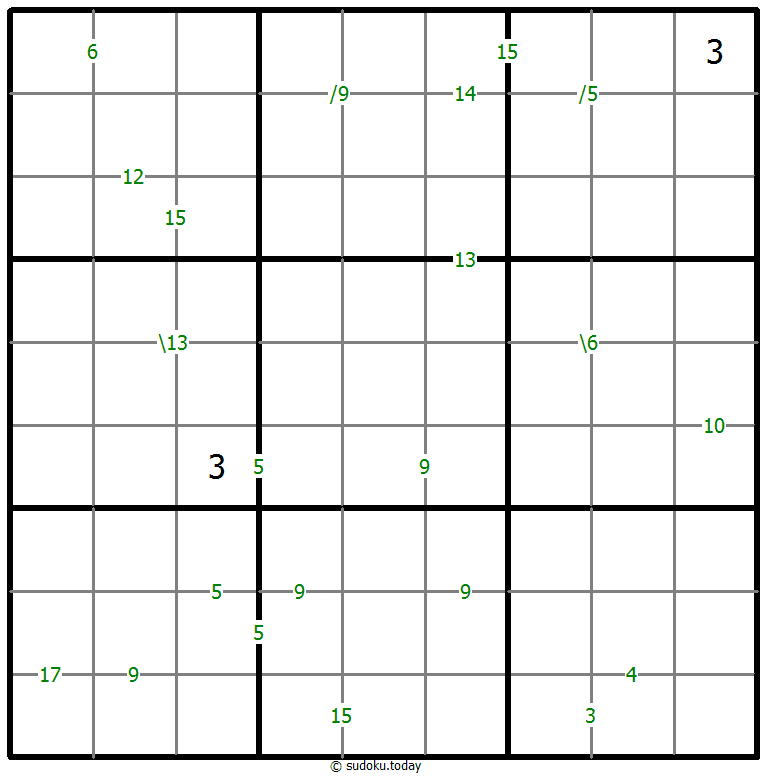
Sums Sudoku
- Place a digit from 1 to 9 into each of the empty squares so that each digit appears exactly once in each of the rows, columns and the nine outlined 3x3 regions.
- A number between two cells indicates the sum of the numbers in these cells. A number between four cells indicates the sum between two diagonally adjacent cells, either top left + right bottom (\) or top right + bottom left (/).
Battenburg Sudoku
- Place a digit from 1 to 9 into each of the empty squares so that each digit appears exactly once in each of the rows, columns and the nine outlined 3x3 regions.
- Everywhere 2 odd and 2 even digits form a 2x2 checkerboard pattern, a Battenburg marking is given. A checkerboard pattern is a 2x2 area of cells where the top-left and bottom-right cells are of one type and the top-right and bottom-left cells are of another type. All possible dots are marked.
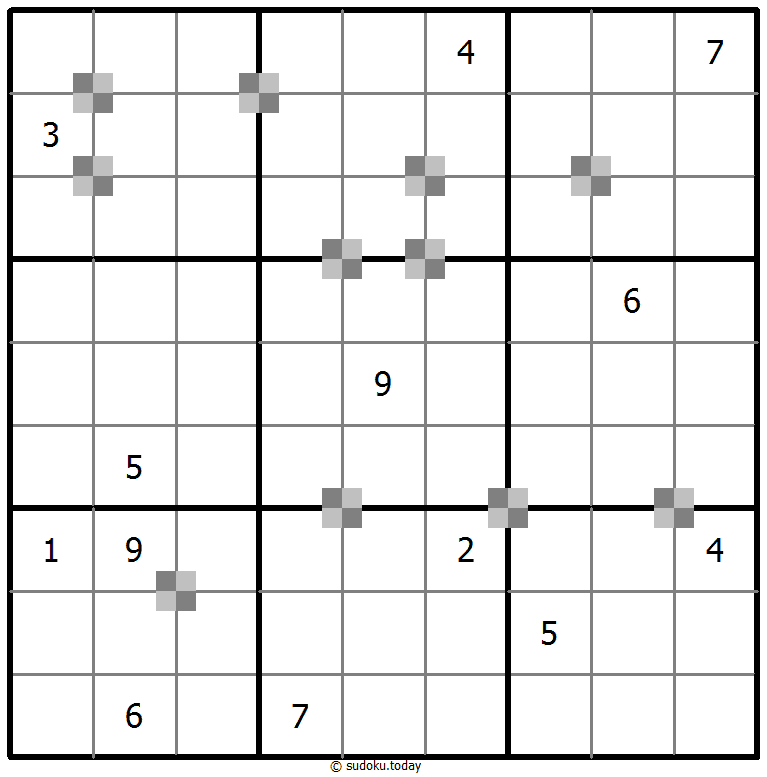
Battenburg Sudoku
- Place a digit from 1 to 9 into each of the empty squares so that each digit appears exactly once in each of the rows, columns and the nine outlined 3x3 regions.
- Everywhere 2 odd and 2 even digits form a 2x2 checkerboard pattern, a Battenburg marking is given. A checkerboard pattern is a 2x2 area of cells where the top-left and bottom-right cells are of one type and the top-right and bottom-left cells are of another type. All possible dots are marked.
Little killer sudoku
- Place a digit from 1 to 9 into each of the empty squares so that each digit appears exactly once in each of the rows, columns and the nine outlined 3x3 regions.
- Numbers with arrows indicate sum of the numbers in each direction.
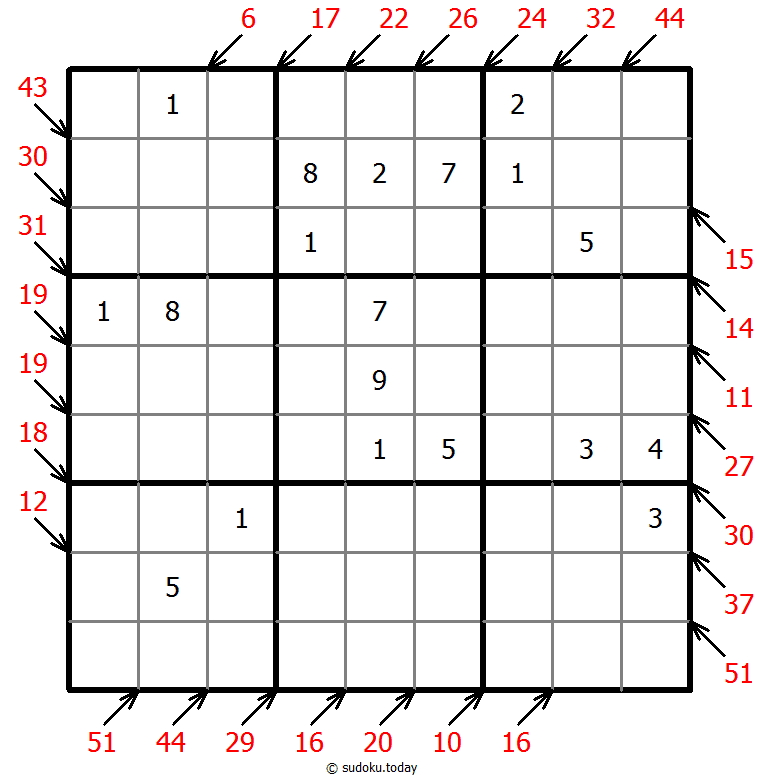
Little killer sudoku
- Place a digit from 1 to 9 into each of the empty squares so that each digit appears exactly once in each of the rows, columns and the nine outlined 3x3 regions.
- Numbers with arrows indicate sum of the numbers in each direction.
Sum Frame Sudoku
- Place a digit from 1 to 9 into each of the empty squares so that each digit appears exactly once in each of the rows, columns and the nine outlined 3x3 regions.
- Digits outside the grid indicate the sum of the first 3 digits in the corresponding direction.
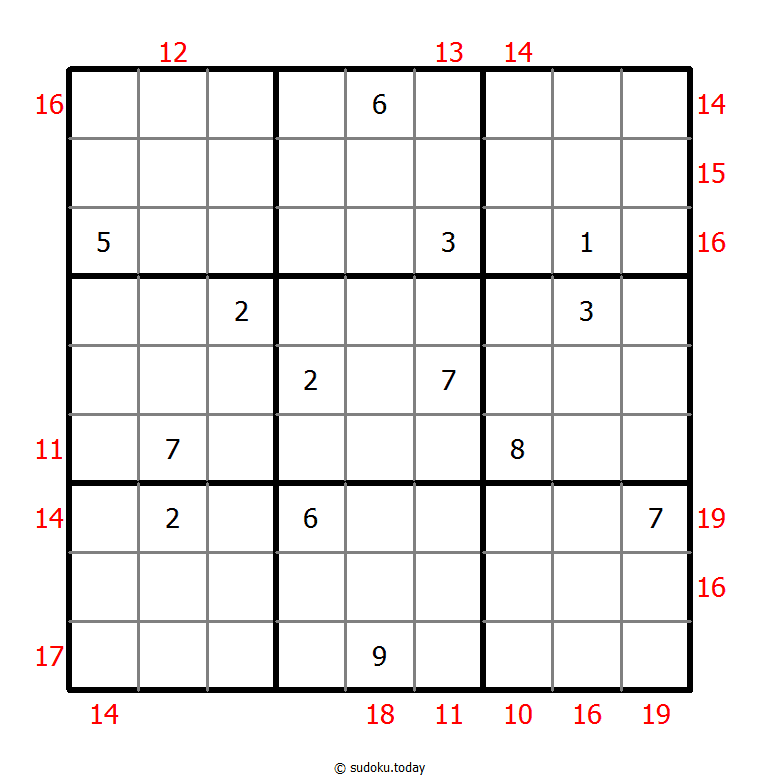
Sum Frame Sudoku
- Place a digit from 1 to 9 into each of the empty squares so that each digit appears exactly once in each of the rows, columns and the nine outlined 3x3 regions.
- Digits outside the grid indicate the sum of the first 3 digits in the corresponding direction.
Group Sum Sudoku
- Place a digit from 1 to 9 into each of the empty squares so that each digit appears exactly once in each of the rows, columns and the nine outlined 3x3 regions.
- Each number at the intersection of four cells is the sum of digits in those four cells.
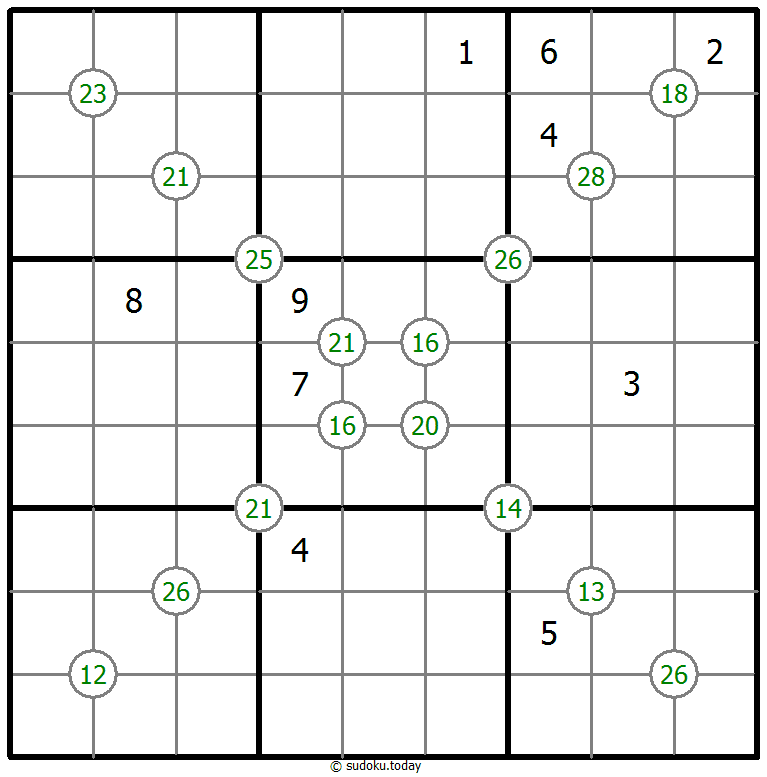
Group Sum Sudoku
- Place a digit from 1 to 9 into each of the empty squares so that each digit appears exactly once in each of the rows, columns and the nine outlined 3x3 regions.
- Each number at the intersection of four cells is the sum of digits in those four cells.
Arrow Sudoku
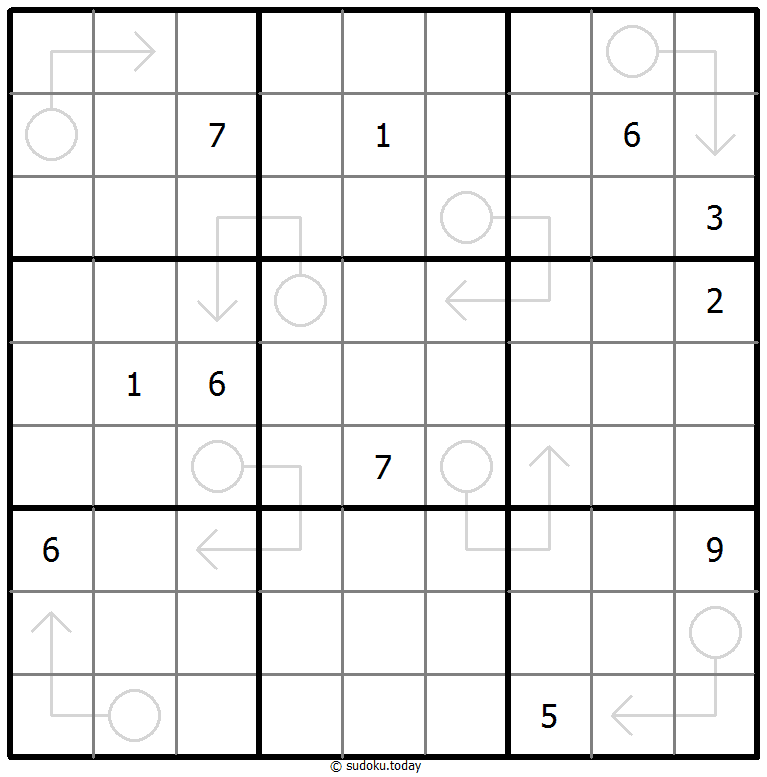
- Place a digit from 1 to 9 into each of the empty squares so that each digit appears exactly once in each of the rows, columns and the nine outlined 3x3 regions.
- The sum of the digits along the path of each arrow equals the digit in the circled cell. Digits may repeat within an arrow shape.
Arrow Sudoku
- Place a digit from 1 to 9 into each of the empty squares so that each digit appears exactly once in each of the rows, columns and the nine outlined 3x3 regions.
- The sum of the digits along the path of each arrow equals the digit in the circled cell. Digits may repeat within an arrow shape.
Greater Than Sudoku
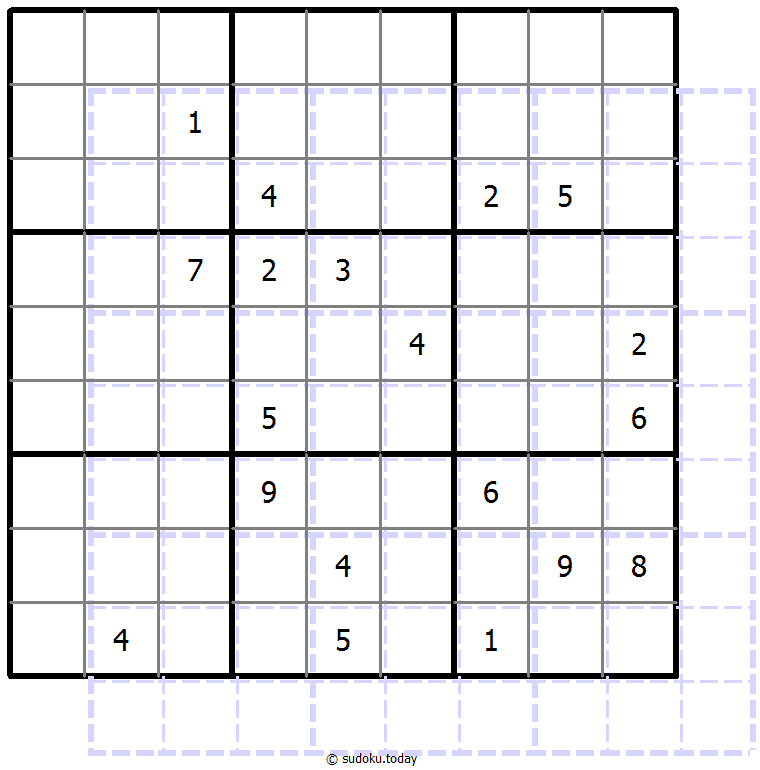
- Place a digit from 1 to 9 into each of the empty squares so that each digit appears exactly once in each of the rows, columns and the nine outlined 3x3 regions.
- Digits have to be place in accordance with the “greater than” signs.
Greater Than Sudoku
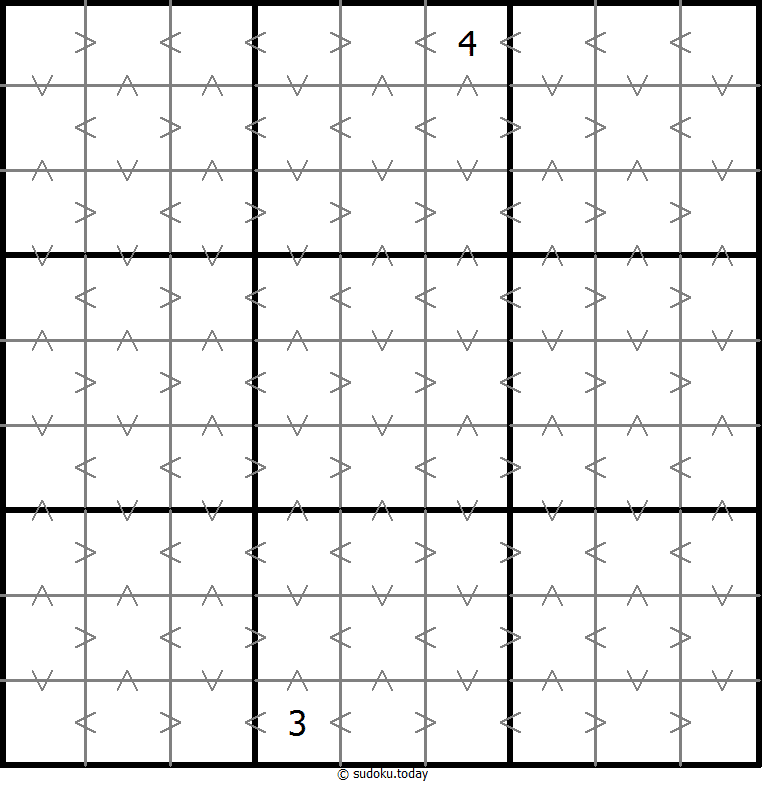
- Place a digit from 1 to 9 into each of the empty squares so that each digit appears exactly once in each of the rows, columns and the nine outlined 3x3 regions.
- Digits have to be place in accordance with the “greater than” signs.
Makodoku
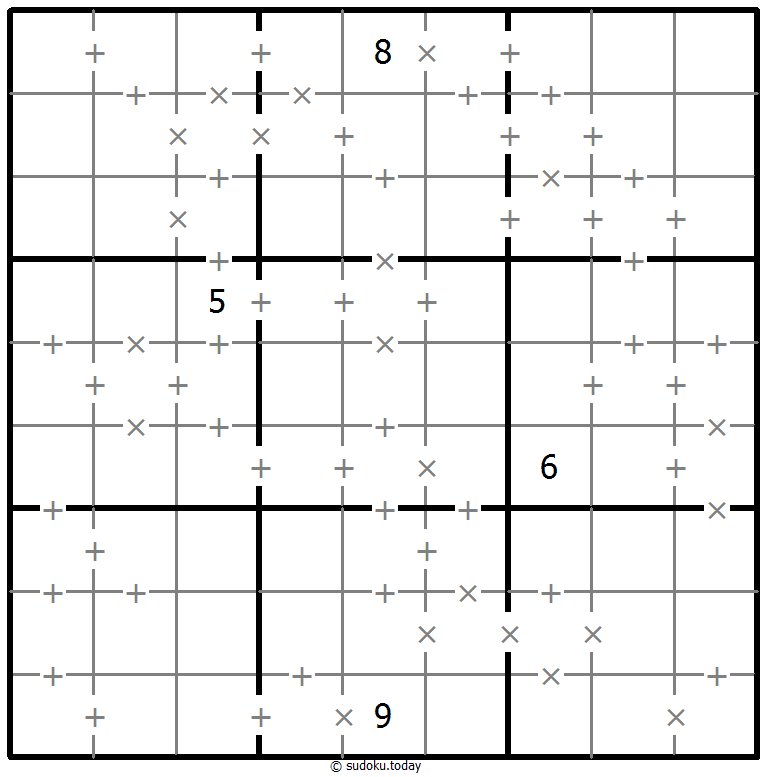
- Place a digit from 1 to 9 into each of the empty squares so that each digit appears exactly once in each of the rows, columns and the nine outlined 3x3 regions.
- A cross between two cells indicates that the product of the numbers in these cells is less than 10. A plus between two cells indicates that the sum of the numbers in these cells is less than 10. If the sum and product are less than 10, then there is a cross between these cells. If there is no sign between two cells, then both sum and product are at least 10.
Makodoku
- Place a digit from 1 to 9 into each of the empty squares so that each digit appears exactly once in each of the rows, columns and the nine outlined 3x3 regions.
- A cross between two cells indicates that the product of the numbers in these cells is less than 10. A plus between two cells indicates that the sum of the numbers in these cells is less than 10. If the sum and product are less than 10, then there is a cross between these cells. If there is no sign between two cells, then both sum and product are at least 10.
Greater Than Sudoku
- Place a digit from 1 to 9 into each of the empty squares so that each digit appears exactly once in each of the rows, columns and the nine outlined 3x3 regions.
- Digits have to be place in accordance with the “greater than” signs.
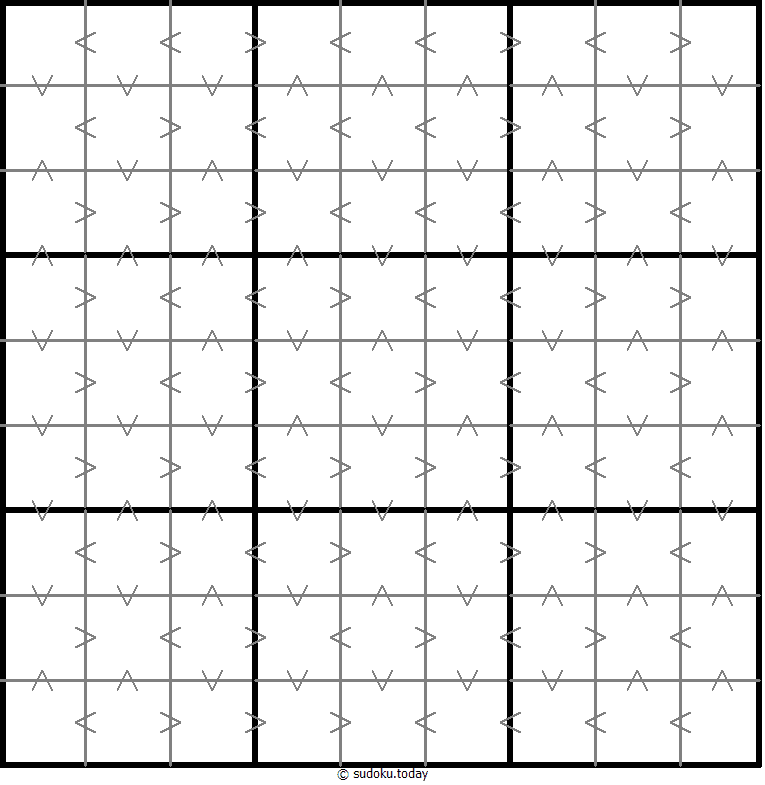
Greater Than Sudoku
- Place a digit from 1 to 9 into each of the empty squares so that each digit appears exactly once in each of the rows, columns and the nine outlined 3x3 regions.
- Digits have to be place in accordance with the “greater than” signs.
English | 中文(简体) | 中文(繁體) | 日本語 | 한국어 | Français | Deutsch | Español | Português | Русский | Italiano | Nederlands | Türkçe | हिन्दी | ไทย | Tiếng Việt | Bahasa Indonesia | Polski | Українська |
数独 | Cool Sudoku | 数独 | Sudoku Puzzle | 賢くなるパズル
© All rights reserved 2019-2026